<?xml version="1.0" encoding="iso-8859-1"?>
<feed xmlns="http://www.w3.org/2005/Atom" xml:lang="de">
<?xml-stylesheet type="text/css" href="/blog/styles/feed.css"?>


<title type="html">tuxad blog</title>
<subtitle type="html"></subtitle>
<link rel="alternate" type="text/html" href="/blog"/>
<link rel="self" type="application/atom+xml" href="/blog/atom.xml"/>
<updated>2022-10-16T22:46:46+02:00</updated>
<author>
<name>Frank W. Bergmann</name>
<uri>/blog</uri>
</author>
<id>/blog/</id>
<generator uri="http://nanoblogger.sourceforge.net" version="3.4.2">
NanoBlogger
</generator>

<entry>
<title type="html">Was ist Digitalisierung?</title>
<author>
<name>Frank W. Bergmann</name>
</author>
<link rel="alternate" type="text/html" href="/blog/archives/2022/10/16/was_ist_digitalisierung/index.html"/>

<id>/blog/archives/2022/10/16/was_ist_digitalisierung/index.html</id>
<published>2022-10-16T13:52:24+02:00</published>
<updated>2022-10-16T13:52:24+02:00</updated>
<category term="politisch_korrekt" />
<content type="xhtml">
<div xmlns="http://www.w3.org/1999/xhtml">
<p>
Die Video-AG des Engelsburg-Gymnasiums hatte der hessischen
"Digitalministerin" Prof. Dr. Kristina Sinemus ein paar Fragen gestellt. Unter
anderem stellten die Kinder die Frage: "Was ist Digitalisierung eigentlich?"
</p>
<p>
Das war ihre Antwort:
<p lang="de">
<q>
Digitalisierung ist eine M&ouml;glichkeit, um &uuml;ber Infrastruktur, also die
Anwendung sozusagen auf den Glasfasernetzen, neue Ideen in die Umsetzung zu
bringen. Digitalisierung hei&szlig;t Anschl&uuml;sse und mathematische Algorithmen - die
Einsen und die Nullen.
</q>
</p>
<p>
Alternativ dazu die spontane Antwort einer 15-j&auml;hrigen Sch&uuml;lerin auf dieselbe
Frage:
</p>
<p lang="de">
<q>
Wenn man zum Beispiel t&auml;gliche Handlungen vereinfacht, indem man sie von
analog zu digital umwandelt.
</q>
</p>
<p>
Diese spontane Antwort der Sch&uuml;lerin entspricht ungef&auml;hr einer vereinfachten
Definition auf
<a href="https://digital-magazin.de/digitalisierung-definition/"
target="_blank">digital-magazin.de</a>:
</p>
<p lang="de">
<q>
Die einfachste Definition von Digitalisierung besagt, dass analoge Inhalte
oder Prozesse in eine digitale Form oder Arbeitsweise umgewandelt werden.
</q>
</p>
<p>
Die Erkl&auml;rung von Frau Prof. Dr. Sinemus ist nicht nur leicht am Thema vorbei,
sondern sogar falsch. Digitalisierung ist unabh&auml;ngig von Netzen und erst recht
sind Glasfasernetze keine Voraussetzung f&uuml;r Digitalisierung. Wenn jemand z.B.
Anfang der 80er Jahre auf einem Apple II (=unvernetzt) ein Textdokument
erstellt hat, das vorher nur handschriftlich vorlag, und das dann mehrfach
ausgedruckt hat, dann stellte das bereits eine "Digitalisierung" dar.
Ebenso werden nicht zwingend Algorithmen ben&ouml;tigt f&uuml;r Verarbeitung,
Speicherung und &Uuml;bertragung digitaler Daten. Und "Anschl&uuml;sse" sind ebenso
irrelevant.
</p>
<p>
Referenz:
<a href="https://www.mediathek-hessen.de/medienview_27194_4-Fragen-an-die-Hessische-Digitalministerin.html" target="_blank">4 Fragen an die Hessische Digitalministerin</a>
</p>
</div>
</content>

</entry>
<entry>
<title type="html">Jitsi Meet RPM packages for RHEL/CentOS/OEL 7</title>
<author>
<name>Frank W. Bergmann</name>
</author>
<link rel="alternate" type="text/html" href="/blog/archives/2021/01/24/jitsi_meet_rpm_packages_for_rhelcentosoel_7/index.html"/>

<id>/blog/archives/2021/01/24/jitsi_meet_rpm_packages_for_rhelcentosoel_7/index.html</id>
<published>2021-01-24T18:19:18+02:00</published>
<updated>2021-01-24T18:19:18+02:00</updated>
<category term="networking" />
<category term="yum" />
<category term="repository" />
<category term="redhat" />
<content type="xhtml">
<div xmlns="http://www.w3.org/1999/xhtml">

<p>
First enable tuxad repository:
</p>
<pre class="language-bash"><code class="language-bash">
rpm -i http://www.tuxad.com/repo/7/tuxad.rpm
</pre>

<p>
We also need the EPEL repository. If you don't have it configured then
follow the instructions on
<a href="https://fedoraproject.org/wiki/EPEL" target="_blank">fedoraproject.org/wiki/EPEL</a>.
</p>

<p>
Next required repo is nodesource.
Enable it via tuxad meta package:
</p>
<pre class="language-bash"><code class="language-bash">
yum install nodesource-release-el7
</pre>

<p>
Install jitsi-meet-install package which will by dependency also install
other required packages:
</p>
<pre class="language-bash"><code class="language-bash">
yum install jitsi-meet-install
</pre>

<p>
Add two entries to your DNS server to point to the server you are
installing on:
</p>
<ul>
<li>jitsi.YOURDOMAIN.COM</li>
<li>auth.jitsi.YOURDOMAIN.COM</li>
</ul>

<p>
After DNS is set up the final Jitsi Meet configuration can be done. The
configuring script will call certbot to get certificates from Let's
Encrypt.
</p>
<p>
It is important that (at least when running the configure script) no
service is running on TCP port 80. If you have an http server running on
this port then shut it down, run the configure script and then start it
up again.
</p>
<p>
The configure script requires at least the IP address (IPv4) and the
hostname. Example:
</p>
<pre class="language-bash"><code class="language-bash">
jitsi-meet-install.sh 1.2.3.4 jitsi.example.com
</pre>
<p>
Run this script with your own settings. You are done!
</p>
</div>
</content>

</entry>
<entry>
<title type="html">Power Measuring several SSDs (Crucial, Kingston, Apacer)</title>
<author>
<name>Frank W. Bergmann</name>
</author>
<link rel="alternate" type="text/html" href="/blog/archives/2020/03/23/power_measuring_several_ssds_crucial_kingston_apacer/index.html"/>

<id>/blog/archives/2020/03/23/power_measuring_several_ssds_crucial_kingston_apacer/index.html</id>
<published>2020-03-23T01:48:49+02:00</published>
<updated>2020-03-23T01:48:49+02:00</updated>

<content type="xhtml">
<div xmlns="http://www.w3.org/1999/xhtml">

<p>
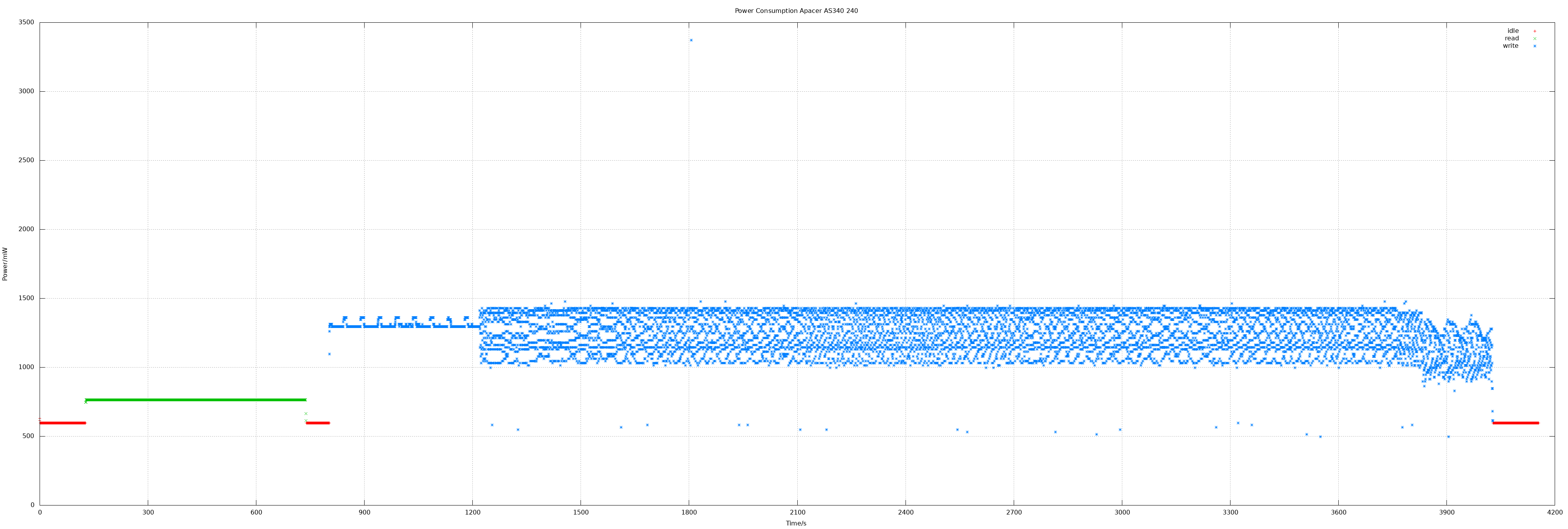
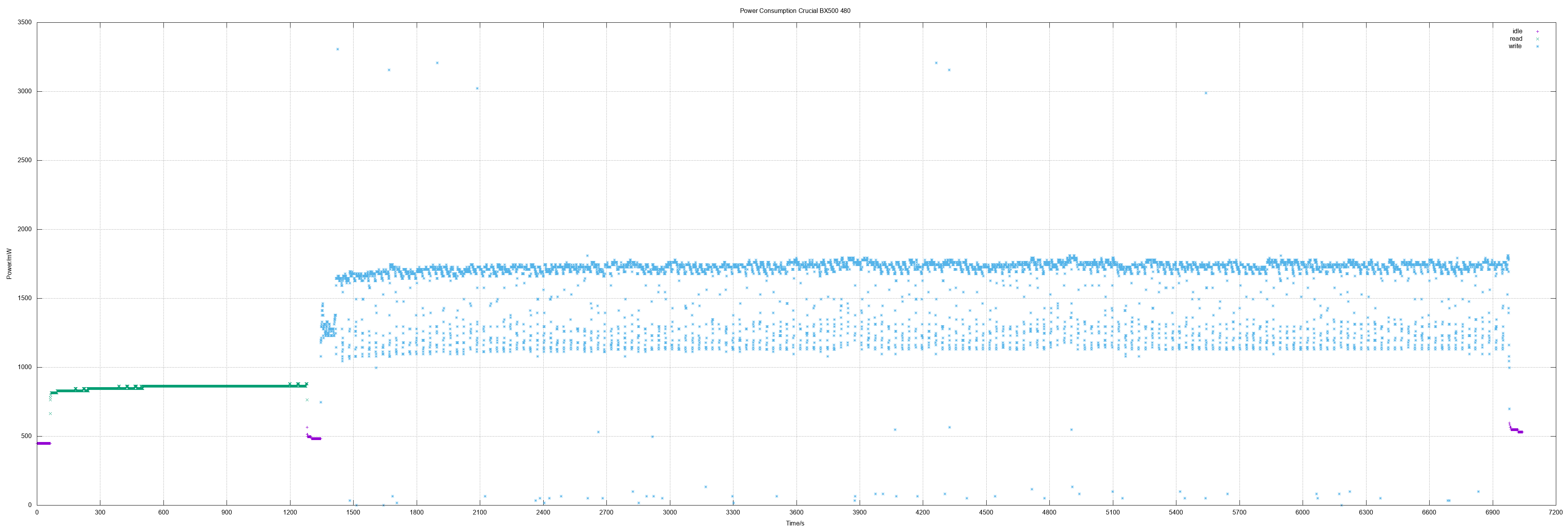
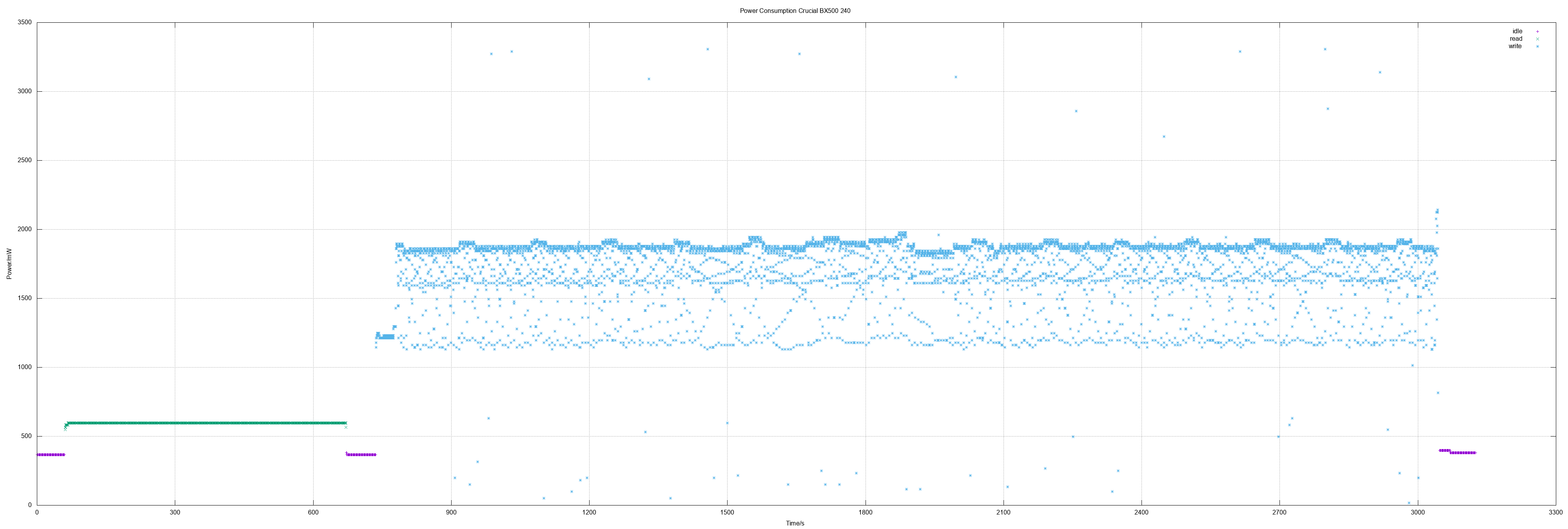
I was curious if the widely used Crucial BX 500 did also "fail" as 480 GB model.
And actually it shows the same picture as the 240 GB model: Fine consumption
on standby, read values "ok" but high on write - with the same high bandwidth
from approx. 1 Watts to 3.3 Watts.
</p>

<p>
Another two Patriot Burst 240 did also show the same results as the first
<a href="/blog/archives/2019/12/16/power_measuring_patriot_burst_240_and_verbatim_vi500_s3_240480/index.html">Patriot Burst 240</a>
measurement.
</p>

<p>
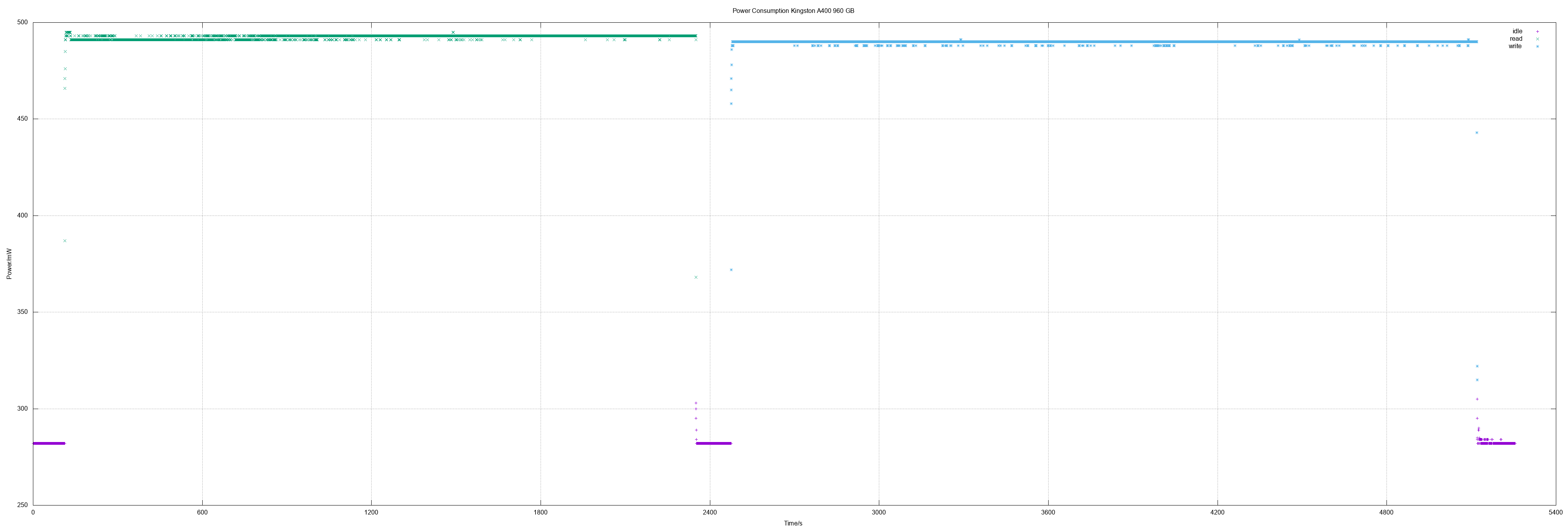
And the Kingston A400 960 was the first "1 TB class" SSD I measured.
It did show the same great values like the 480 model did.
</p>

<p>
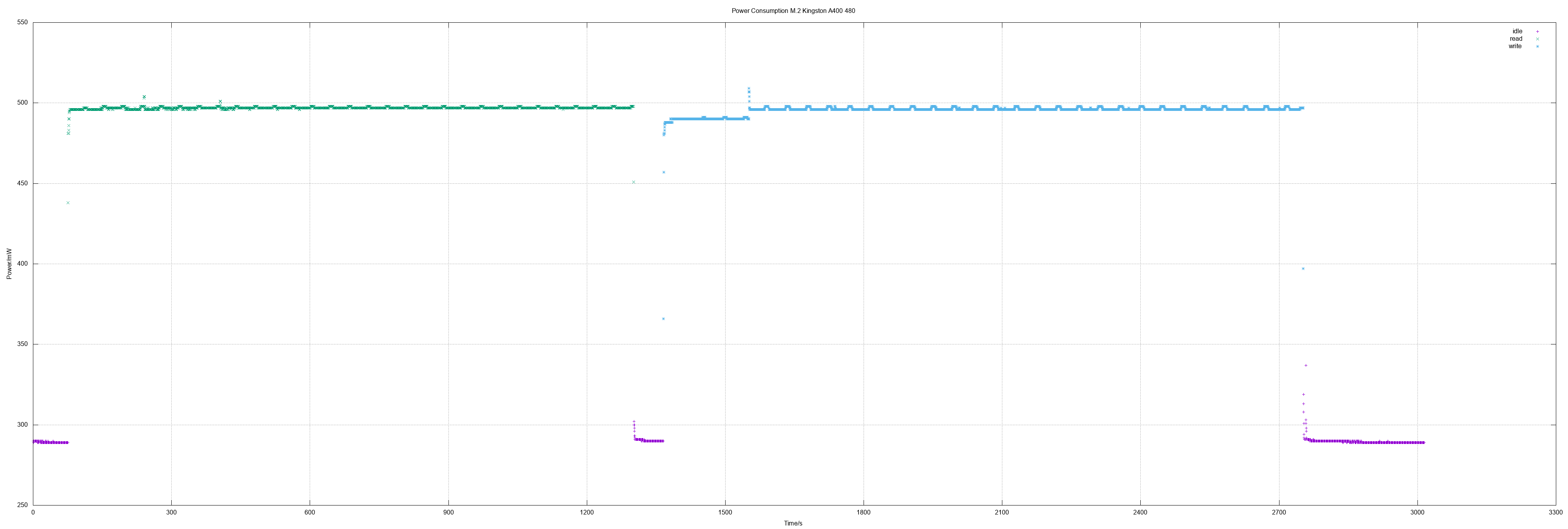
In addition to even more SSDs I made also the first measurement of an M.2 SSD
(SATA, of course).
Values were the same as for 2.5" SSD.
</p>

<h4>Apacer AS340 240 GB</h4>
<p>
240 GB means actually 468862128 sectors.
</p>
<ul>
<li>Idle 0.6 W</li>
<li>Read 0.76 W</li>
<li>Write 1.25 W, max 3.3 W</li>
<li>Read all sectors: 10m15.074s (372 MiB/s)</li>
<li>Write all sectors: 50m43.854s (75 MiB/s)</li>
</ul>
<p style="text-align:center">
<a href="/blog/ssd-power-measuring-apacer-as340-240/apacer-as340-240_big.png"><img src="/blog/ssd-power-measuring-apacer-as340-240/apacer-as340-240_small.png" width="440" height="320" alt="x-y diagram of measurements" /></a>
</p>

<h4>Crucial BX500 480</h4>
<p>
480 GB means actually 937703088 sectors.
</p>
<ul>
<li>Idle 0.49 W</li>
<li>Read 0.86 W</li>
<li>Write 1.66 W</li>
<li>Read all sectors: 20m25.698s (373 MiB/s)</li>
<li>Write all sectors: 94m0.830s (81 MiB/s)</li>
</ul>
<p style="text-align:center">
<a href="/blog/ssd-power-measuring-crucial-bx500-480/crucial-bx500-480_big.png"><img src="/blog/ssd-power-measuring-crucial-bx500-480/crucial-bx500-480_small.png" width="440" height="320" alt="x-y diagram of measurements" /></a>
</p>

<h4>Kingston A400 960</h4>
<p>
960 GB means actually 1875385008 sectors.
</p>
<ul>
<li>Idle 0.28 W</li>
<li>Read 0.49 W</li>
<li>Write 0.49 W</li>
<li>Read all sectors: 37m22.774s (408 MiB/s)</li>
<li>Write all sectors: 44m10.833s (345 MiB/s)</li>
</ul>
<p style="text-align:center">
<a href="/blog/ssd-power-measuring-kingston-a400-960-gb/kingston-a400-960_big.png"><img src="/blog/ssd-power-measuring-kingston-a400-960-gb/kingston-a400-960_small.png" width="440" height="320" alt="x-y diagram of measurements" /></a>
</p>

<h4>M.2 Kingston A400 480</h4>
<p>
480 GB means actually 937703088 sectors.
</p>
<ul>
<li>Idle 0.3 W</li>
<li>Read 0.5 W</li>
<li>Write 0.5 W</li>
<li>Read all sectors: 20m29.645s (372 MiB/s)</li>
<li>Write all sectors: 23m11.808s (329 MiB/s)</li>
</ul>
<p style="text-align:center">
<a href="/blog/m2-power-measuring-kingston-a400-480/kingston-a400-480-m2_big.png"><img src="/blog/m2-power-measuring-kingston-a400-480/kingston-a400-480-m2_small.png" width="440" height="320" alt="x-y diagram of measurements" /></a>
</p>

<h4>Values overview</h4>
<table cellpadding=4 border=0>
<tr>
<th>SATA SSD</th>
<th>r pow<br>(W)</th>
<th>w pow<br>(W)</th>
<th>r spd<br>(MB/s)</th>
<th>w spd<br>(MB/s)</th>
</tr>
<tr>
<th><a href="/blog/archives/2018/04/04/power_measuring_adata_su800/index.html">ADATA SU800 256</a></th>
<td>1.4</td>
<td>2.2</td>
<td></td>
<td></td>
</tr>
<tr>
<th>Apacer AS340 240</th>
<td>0.76</td>
<td>1.25</td>
<td>372</td>
<td>75</td>
</tr>
<tr>
<th><a href="/blog/archives/2018/10/03/power_measuring_corsair_force_le200b_120_gb_2/index.html">Corsair Force LE 120</a></th>
<td>0.58</td>
<td>0.58</td>
<td></td>
<td></td>
</tr>
<tr>
<th><a href="/blog/archives/2020/02/02/power_measuring_crucial_bx500_240/index.html">Crucial BX500 240</a></th>
<td>0.6</td>
<td>1.7</td>
<td>372</td>
<td>99</td>
</tr>
<tr>
<th>Crucial BX500 480</th>
<td>0.86</td>
<td>1.66</td>
<td>373</td>
<td>81</td>
</tr>
<tr>
<th><a href="/blog/archives/2019/02/25/power_measuring_kingston_a400_240_gb/index.html">Kingston A400 240</a></th>
<td>0.52</td>
<td>1.08</td>
<td>371</td>
<td>290</td>
</tr>
<tr>
<th><a href="/blog/archives/2020/01/25/power_measuring_kingston_a400_480_and_samsung_mz7ln128/index.html">Kingston A400 480</a></th>
<td>0.5</td>
<td>0.5</td>
<td>371</td>
<td>328</td>
</tr>
<tr>Kingston A400 960</th>
<th>
<td>0.49</td>
<td>0.49</td>
<td>408</td>
<td>345</td>
</tr>
<tr>
<th><a href="/blog/archives/2019/01/06/power_measuring_patriot_burst_120_gb/index.html">Patriot Burst 120</a></th>
<td>0.54</td>
<td>0.54</td>
<td>371</td>
<td>86</td>
</tr>
<tr>
<th><a href="/blog/archives/2019/12/16/power_measuring_patriot_burst_240_and_verbatim_vi500_s3_240480/index.html">Patriot Burst 240</a></th>
<td>0.52</td>
<td>0.52</td>
<td>369</td>
<td>327</td>
</tr>
<tr>
<th><a href="/blog/archives/2020/01/04/power_measuring_patriot_burst_480_and_wd_wd10spzx/index.html">Patriot Burst 480</a></th>
<td>0.51</td>
<td>0.5</td>
<td>371</td>
<td>328</td>
</tr>
<tr>
<th><a href="/blog/archives/2020/01/25/power_measuring_kingston_a400_480_and_samsung_mz7ln128/index.html">Samsung MZ7LN128</a></th>
<td>0.97</td>
<td>1.57</td>
<td>353</td>
<td>150</td>
</tr>
<tr>
<th><a href="/blog/archives/2018/04/06/power_measuring_sandisk_z410/index.html">Sandisk Z410 120</a></th>
<td>0.7</td>
<td>1.5</td>
<td></td>
<td></td>
</tr>
<tr>
<th><a href="/blog/archives/2019/12/16/power_measuring_patriot_burst_240_and_verbatim_vi500_s3_240480/index.html">Verbatim Vi500 S3 240</a></th>
<td>0.59</td>
<td>0.98</td>
<td>211</td>
<td>117</td>
</tr>
<tr>
<th><a href="/blog/archives/2019/12/16/power_measuring_patriot_burst_240_and_verbatim_vi500_s3_240480/index.html">Verbatim Vi500 S3 480</a></th>
<td>0.84</td>
<td>1.13</td>
<td>359</td>
<td>129</td>
</tr>
<tr>
<th><a href="/blog/archives/2018/04/09/power_measuring_wd_green_pc_ssd_120_gb/index.html">WD Green 120</a></th>
<td>0.96</td>
<td>1.3</td>
<td></td>
<td></td>
</tr>
</table>

<table cellpadding=4 border=0>
<tr>
<th>M.2 SATA</th>
<th>r pow<br>(W)</th>
<th>w pow<br>(W)</th>
<th>r spd<br>(MB/s)</th>
<th>w spd<br>(MB/s)</th>
</tr>
<tr>
<th>Kingston A400 480</th>
<td>0.5</td>
<td>0.5</td>
<td>372</td>
<td>329</td>
</tr>
</table>

<table cellpadding=4 border=0>
<tr>
<th>2.5 HD</th>
<th>r pow<br>(W)</th>
<th>w pow<br>(W)</th>
<th>r spd<br>(MB/s)</th>
<th>w spd<br>(MB/s)</th>
</tr>
<tr>
<th><a href="/blog/archives/2019/01/06/power_measuring_seagate_st1000lm048/index.html">Seagate ST1000LM048</a></th>
<td>2.7</td>
<td>2.6</td>
<td></td>
<td></td>
</tr>
<tr>
<th><a href="/blog/archives/2019/01/06/power_measuring_toshiba_mq02abd100h/index.html">Toshiba MQ02ABD100H</a></th>
<td>2.6</td>
<td>3.0</td>
<td></td>
<td></td>
</tr>
<tr>
<th><a href="/blog/archives/2020/01/04/power_measuring_patriot_burst_480_and_wd_wd10spzx/index.html">WD WD10SPZX</a></th>
<td>1.62</td>
<td>2.47</td>
<td>256</td>
<td></td>
</tr>
</table>
<table cellpadding=4 border=0>
<tr>
<th>3.5 HD</th>
<th>r pow<br>(W)</th>
<th>w pow<br>(W)</th>
<th>r spd<br>(MB/s)</th>
<th>w spd<br>(MB/s)</th>
</tr>
<tr>
<th><a href="/blog/archives/2020/01/04/power_measuring_patriot_burst_480_and_wd_wd10spzx/index.html">Seagate ST1000DM010</a></th>
<td>2.69</td>
<td>2.29</td>
<td></td>
<td></td>
</tr>
<tr>
<th><a href="/blog/archives/2020/01/04/power_measuring_patriot_burst_480_and_wd_wd10spzx/index.html">Toshiba DT01ACA100</a></th>
<td>2.86</td>
<td>2.94</td>
<td></td>
<td></td>
</tr>
</table>

<h4>Method</h4>
<p>
Measuring environment is explained in
<a href="/blog/archives/2018/04/04/power_measuring_adata_su800/index.html">power measuring ADATA SU800</a>.
The calculation of speed as logged in latest measurements was simply done by
taking the time for reading and writing the whole SSD in relation to its size.
</p>

<h4>Other measurements</h4>
<ul>
<li><a href="/blog/archives/2020/02/02/power_measuring_crucial_bx500_240/index.html">Crucial BX500 240</a></li>
<li><a href="/blog/archives/2020/01/25/power_measuring_kingston_a400_480_and_samsung_mz7ln128/index.html">Kingston A400 480, Samsung MZ7LN128</a></li>
<li><a href="/blog/archives/2020/01/04/power_measuring_patriot_burst_480_and_wd_wd10spzx/index.html">Patriot Burst 480, WD WD10SPZX</a></li>
<li><a href="/blog/archives/2019/12/16/power_measuring_patriot_burst_240_and_verbatim_vi500_s3_240480/index.html">Patriot Burst 240, Verbatim Vi500 S3 240/480</a></li>
<li><a href="/blog/archives/2019/02/25/power_measuring_kingston_a400_240_gb/index.html">Kingston A400 240 GB</a></li>
<li><a href="/blog/archives/2019/01/06/power_measuring_patriot_burst_120_gb/index.html">Patriot Burst 120 GB</a></li>
<li><a href="/blog/archives/2019/01/06/power_measuring_seagate_st1000lm048/index.html">Seagate ST1000LM048</a></li>
<li><a href="/blog/archives/2019/01/06/power_measuring_toshiba_mq02abd100h/index.html">Toshiba MQ02ABD100H</a></li>
<li><a href="/blog/archives/2018/10/03/power_measuring_corsair_force_le200b_120_gb_2/index.html">Corsair Force LE200B 120 GB (2nd disk measured)</a></li>
<li><a href="/blog/archives/2018/10/03/power_measuring_kingston_a400_120_gb/index.html">Kingston A400 120 GB</a></li>
<li><a href="/blog/archives/2018/05/11/power_measuring_corsair_force_le200b_120_gb/index.html">Corsair Force LE200B 120 GB</a></li>
<li><a href="/blog/archives/2018/04/09/power_measuring_wd_green_pc_ssd_120_gb/index.html">WD Green PC SSD</a></li>
<li><a href="/blog/archives/2018/04/04/power_measuring_adata_su800/index.html">ADATA SU800</a></li>
<li><a href="/blog/archives/2018/04/06/power_measuring_sandisk_z410/index.html">Sandisk Z410</a></li>
</ul>
</div>
</content>

</entry>
<entry>
<title type="html">Power Measuring Crucial BX500 240</title>
<author>
<name>Frank W. Bergmann</name>
</author>
<link rel="alternate" type="text/html" href="/blog/archives/2020/02/02/power_measuring_crucial_bx500_240/index.html"/>

<id>/blog/archives/2020/02/02/power_measuring_crucial_bx500_240/index.html</id>
<published>2020-02-02T14:31:58+02:00</published>
<updated>2020-02-02T14:31:58+02:00</updated>

<content type="xhtml">
<div xmlns="http://www.w3.org/1999/xhtml">

<p>
I ordered a Crucial BX250 because it was several times recommended by
german magazine c't (Heise Verlag). It was also part of a recommendation
for a DYI low power system "7-Watt-Mini" in c't 24/2019.
</p>
<p>
Unfortunately I can't understand this recommendation: The SSD has low
write transfer rates and has a high power consumption on write. And even
its (low) power consumption on read is higher than Corsair, Kingston and
Patriot have.
</p>

<h4>Crucial BX500 240</h4>
<p>
240 GB means actually 468862128 sectors.
</p>
<ul>
<li>Idle 0.37 W</li>
<li>Read 0.6 W</li>
<li>Write 1.74 W, max 3.3 W</li>
<li>Read all sectors: 10m14.784s (372 MiB/s)</li>
<li>Write all sectors: 38m32.850s (99 MiB/s)</li>
</ul>
<p style="text-align:center">
<a href="/blog/ssd-power-measuring-crucial-bx500-240/crucial-bx500-240_big.png"><img src="/blog/ssd-power-measuring-crucial-bx500-240/crucial-bx500-240_small.png" width="440" height="320" alt="x-y diagram of measurements" /></a>
</p>

<h4>Values overview</h4>
<table cellpadding=4 border=0>
<tr>
<th>SATA SSD</th>
<th>r pow<br>(W)</th>
<th>w pow<br>(W)</th>
<th>r spd<br>(MB/s)</th>
<th>w spd<br>(MB/s)</th>
</tr>
<tr>
<th><a href="/blog/archives/2018/04/04/power_measuring_adata_su800/index.html">ADATA SU800 256</a></th>
<td>1.4</td>
<td>2.2</td>
<td></td>
<td></td>
</tr>
<tr>
<th><a href="/blog/archives/2018/10/03/power_measuring_corsair_force_le200b_120_gb_2/index.html">Corsair Force LE 120</a></th>
<td>0.58</td>
<td>0.58</td>
<td></td>
<td></td>
</tr>
<tr>
<th>Crucial BX500 240</th>
<td>0.6</td>
<td>1.7</td>
<td>372</td>
<td>99</td>
</tr>
<tr>
<th><a href="/blog/archives/2020/01/25/power_measuring_kingston_a400_480_and_samsung_mz7ln128/index.html">Kingston A400 480</a></th>
<td>0.5</td>
<td>0.5</td>
<td>371</td>
<td>328</td>
</tr>
<tr>
<th><a href="/blog/archives/2019/02/25/power_measuring_kingston_a400_240_gb/index.html">Kingston A400 240</a></th>
<td>0.52</td>
<td>1.08</td>
<td>371</td>
<td>290</td>
</tr>
<tr>
<th><a href="/blog/archives/2019/01/06/power_measuring_patriot_burst_120_gb/index.html">Patriot Burst 120</a></th>
<td>0.54</td>
<td>0.54</td>
<td>371</td>
<td>86</td>
</tr>
<tr>
<th><a href="/blog/archives/2019/12/16/power_measuring_patriot_burst_240_and_verbatim_vi500_s3_240480/index.html">Patriot Burst 240</a></th>
<td>0.52</td>
<td>0.52</td>
<td>369</td>
<td>327</td>
</tr>
<tr>
<th><a href="/blog/archives/2020/01/04/power_measuring_patriot_burst_480_and_wd_wd10spzx/index.html">Patriot Burst 480</a></th>
<td>0.51</td>
<td>0.5</td>
<td>371</td>
<td>328</td>
</tr>
<tr>
<th><a href="/blog/archives/2020/01/25/power_measuring_kingston_a400_480_and_samsung_mz7ln128/index.html">Samsung MZ7LN128</a></th>
<td>0.97</td>
<td>1.57</td>
<td>353</td>
<td>150</td>
</tr>
<tr>
<th><a href="/blog/archives/2018/04/06/power_measuring_sandisk_z410/index.html">Sandisk Z410 120</a></th>
<td>0.7</td>
<td>1.5</td>
<td></td>
<td></td>
</tr>
<tr>
<th><a href="/blog/archives/2019/12/16/power_measuring_patriot_burst_240_and_verbatim_vi500_s3_240480/index.html">Verbatim Vi500 S3 240</a></th>
<td>0.59</td>
<td>0.98</td>
<td>211</td>
<td>117</td>
</tr>
<tr>
<th><a href="/blog/archives/2019/12/16/power_measuring_patriot_burst_240_and_verbatim_vi500_s3_240480/index.html">Verbatim Vi500 S3 480</a></th>
<td>0.84</td>
<td>1.13</td>
<td>359</td>
<td>129</td>
</tr>
<tr>
<th><a href="/blog/archives/2018/04/09/power_measuring_wd_green_pc_ssd_120_gb/index.html">WD Green 120</a></th>
<td>0.96</td>
<td>1.3</td>
<td></td>
<td></td>
</tr>
</table>
<table cellpadding=4 border=0>
<tr>
<th>2.5 HD</th>
<th>r pow<br>(W)</th>
<th>w pow<br>(W)</th>
<th>r spd<br>(MB/s)</th>
<th>w spd<br>(MB/s)</th>
</tr>
<tr>
<th><a href="/blog/archives/2019/01/06/power_measuring_seagate_st1000lm048/index.html">Seagate ST1000LM048</a></th>
<td>2.7</td>
<td>2.6</td>
<td></td>
<td></td>
</tr>
<tr>
<th><a href="/blog/archives/2019/01/06/power_measuring_toshiba_mq02abd100h/index.html">Toshiba MQ02ABD100H</a></th>
<td>2.6</td>
<td>3.0</td>
<td></td>
<td></td>
</tr>
<tr>
<th><a href="/blog/archives/2020/01/04/power_measuring_patriot_burst_480_and_wd_wd10spzx/index.html">WD WD10SPZX</a></th>
<td>1.62</td>
<td>2.47</td>
<td>256</td>
<td></td>
</tr>
</table>
<table cellpadding=4 border=0>
<tr>
<th>3.5 HD</th>
<th>r pow<br>(W)</th>
<th>w pow<br>(W)</th>
<th>r spd<br>(MB/s)</th>
<th>w spd<br>(MB/s)</th>
</tr>
<tr>
<th><a href="/blog/archives/2020/01/04/power_measuring_patriot_burst_480_and_wd_wd10spzx/index.html">Seagate ST1000DM010</a></th>
<td>2.69</td>
<td>2.29</td>
<td></td>
<td></td>
</tr>
<tr>
<th><a href="/blog/archives/2020/01/04/power_measuring_patriot_burst_480_and_wd_wd10spzx/index.html">Toshiba DT01ACA100</a></th>
<td>2.86</td>
<td>2.94</td>
<td></td>
<td></td>
</tr>
</table>

<h4>Method</h4>
<p>
Measuring environment is explained in
<a href="/blog/archives/2018/04/04/power_measuring_adata_su800/index.html">power measuring ADATA SU800</a>.
The calculation of speed as logged in latest measurements was simply done by
taking the time for reading and writing the whole SSD in relation to its size.
</p>

<h4>Other measurements</h4>
<ul>
<li><a href="/blog/archives/2020/01/25/power_measuring_kingston_a400_480_and_samsung_mz7ln128/index.html">Kingston A400 480, Samsung MZ7LN128</a></li>
<li><a href="/blog/archives/2020/01/04/power_measuring_patriot_burst_480_and_wd_wd10spzx/index.html">Patriot Burst 480, WD WD10SPZX</a></li>
<li><a href="/blog/archives/2019/12/16/power_measuring_patriot_burst_240_and_verbatim_vi500_s3_240480/index.html">Patriot Burst 240, Verbatim Vi500 S3 240/480</a></li>
<li><a href="/blog/archives/2019/02/25/power_measuring_kingston_a400_240_gb/index.html">Kingston A400 240 GB</a></li>
<li><a href="/blog/archives/2019/01/06/power_measuring_patriot_burst_120_gb/index.html">Patriot Burst 120 GB</a></li>
<li><a href="/blog/archives/2019/01/06/power_measuring_seagate_st1000lm048/index.html">Seagate ST1000LM048</a></li>
<li><a href="/blog/archives/2019/01/06/power_measuring_toshiba_mq02abd100h/index.html">Toshiba MQ02ABD100H</a></li>
<li><a href="/blog/archives/2018/10/03/power_measuring_corsair_force_le200b_120_gb_2/index.html">Corsair Force LE200B 120 GB (2nd disk measured)</a></li>
<li><a href="/blog/archives/2018/10/03/power_measuring_kingston_a400_120_gb/index.html">Kingston A400 120 GB</a></li>
<li><a href="/blog/archives/2018/05/11/power_measuring_corsair_force_le200b_120_gb/index.html">Corsair Force LE200B 120 GB</a></li>
<li><a href="/blog/archives/2018/04/09/power_measuring_wd_green_pc_ssd_120_gb/index.html">WD Green PC SSD</a></li>
<li><a href="/blog/archives/2018/04/04/power_measuring_adata_su800/index.html">ADATA SU800</a></li>
<li><a href="/blog/archives/2018/04/06/power_measuring_sandisk_z410/index.html">Sandisk Z410</a></li>
</ul>
</div>
</content>

</entry>
<entry>
<title type="html">Power Measuring Kingston A400 480 and Samsung MZ7LN128</title>
<author>
<name>Frank W. Bergmann</name>
</author>
<link rel="alternate" type="text/html" href="/blog/archives/2020/01/25/power_measuring_kingston_a400_480_and_samsung_mz7ln128/index.html"/>

<id>/blog/archives/2020/01/25/power_measuring_kingston_a400_480_and_samsung_mz7ln128/index.html</id>
<published>2020-01-25T16:00:49+02:00</published>
<updated>2020-01-25T16:00:49+02:00</updated>

<content type="xhtml">
<div xmlns="http://www.w3.org/1999/xhtml">

<p>
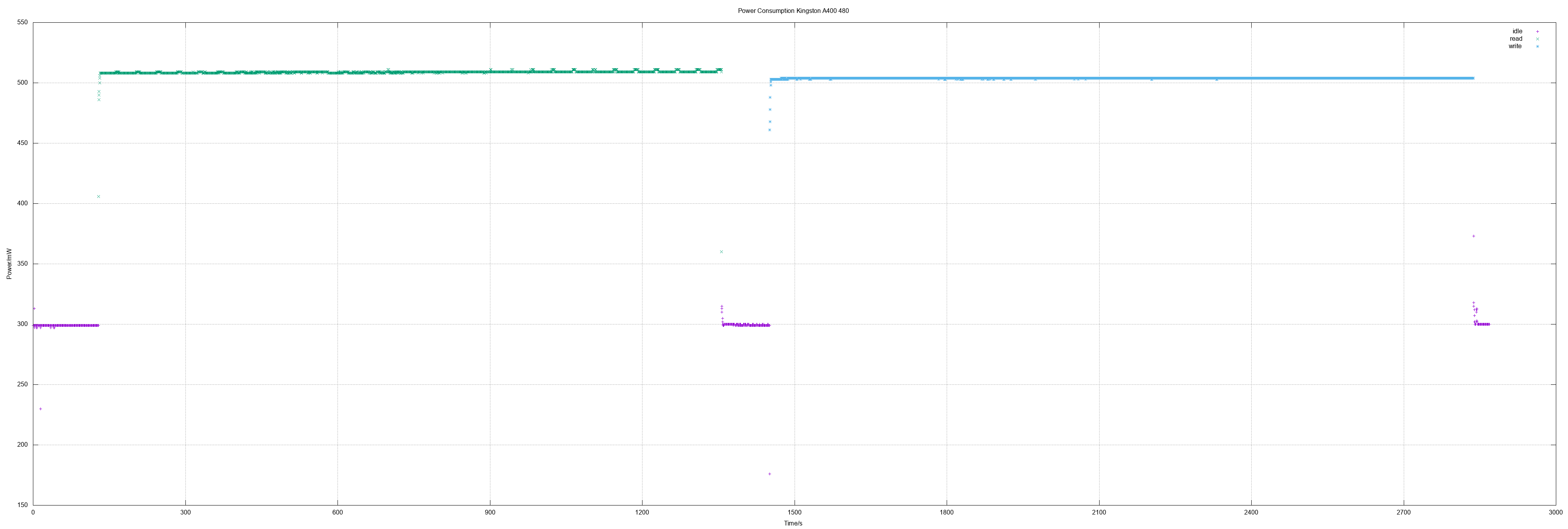
In this session I measured a Kingston A400 480 which is much better than the
smaller sizes. It's as great as the Patriot Burst 480: Very fast and very
low power consumption. Additionally an old (used) Samsung 128 was measured.
</p>

<h4>Kingston A400 480</h4>
<p>
480 GB means actually 937703088 sectors.
</p>
<ul>
<li>Idle 0.3 W</li>
<li>Read 0.5 W</li>
<li>Write 0.5 W</li>
<li>Read all sectors: 20m31.041s (371 MiB/s)</li>
<li>Write all sectors: 23m12.412s (328 MiB/s)</li>
</ul>
<p style="text-align:center">
<a href="/blog/ssd-power-measuring-kingston-a400-480/kingston-a400-480_big.png"><img src="/blog/ssd-power-measuring-kingston-a400-480/kingston-a400-480_small.png" width="440" height="320" alt="x-y diagram of measurements" /></a>
</p>

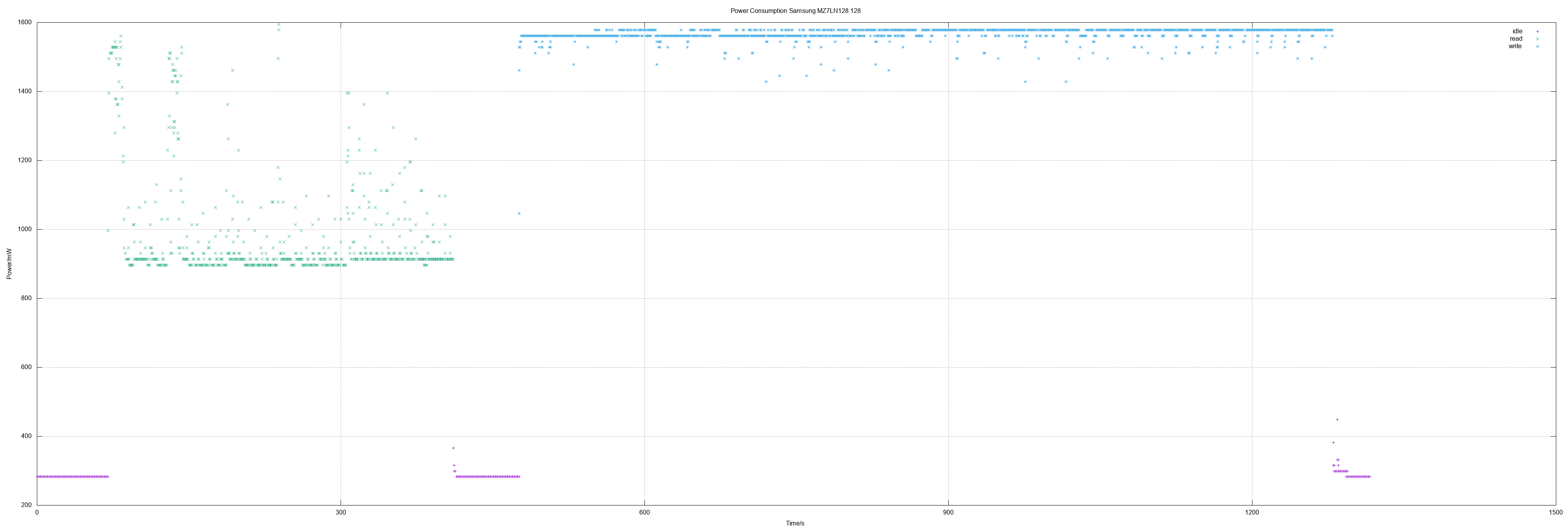
<h4>Samsung MZ7LN128</h4>
<p>
128 GB means actually 250069680 sectors.
</p>
<ul>
<li>Idle 0.28 W</li>
<li>Read 0.97 W, max 1.59 W</li>
<li>Write 1.57 W</li>
<li>Read all sectors: 5m45.429s (353 MiB/s)</li>
<li>Write all sectors: 13m32.761s (150 MiB/s)</li>
</ul>
<p style="text-align:center">
<a href="/blog/ssd-power-measuring-samsung-mz7ln128/samsung-mz7ln128-128_big.png"><img src="/blog/ssd-power-measuring-samsung-mz7ln128/samsung-mz7ln128-128_small.png" width="440" height="320" alt="x-y diagram of measurements" /></a>
</p>

<h4>Values overview</h4>
<table cellpadding=4 border=0>
<tr>
<th>SATA SSD</th>
<th>r pow<br>(W)</th>
<th>w pow<br>(W)</th>
<th>r spd<br>(MB/s)</th>
<th>w spd<br>(MB/s)</th>
</tr>
<tr>
<th><a href="/blog/archives/2018/04/04/power_measuring_adata_su800/index.html">ADATA SU800 256</a></th>
<td>1.4</td>
<td>2.2</td>
<td></td>
<td></td>
</tr>
<tr>
<th><a href="/blog/archives/2018/10/03/power_measuring_corsair_force_le200b_120_gb_2/index.html">Corsair Force LE 120</a></th>
<td>0.58</td>
<td>0.58</td>
<td></td>
<td></td>
</tr>
<tr>
<th><a href="/blog/archives/2018/10/03/power_measuring_kingston_a400_120_gb/index.html">Kingston A400 120</a></th>
<td>0.51</td>
<td>1.03</td>
<td>371</td>
<td></td>
</tr>
<tr>
<th>Kingston A400 480</th>
<td>0.5</td>
<td>0.5</td>
<td>371</td>
<td>328</td>
</tr>
<tr>
<th><a href="/blog/archives/2019/02/25/power_measuring_kingston_a400_240_gb/index.html">Kingston A400 240</a></th>
<td>0.52</td>
<td>1.08</td>
<td>371</td>
<td>290</td>
</tr>
<tr>
<th><a href="/blog/archives/2019/01/06/power_measuring_patriot_burst_120_gb/index.html">Patriot Burst 120</a></th>
<td>0.54</td>
<td>0.54</td>
<td>371</td>
<td>86</td>
</tr>
<tr>
<th><a href="/blog/archives/2019/12/16/power_measuring_patriot_burst_240_and_verbatim_vi500_s3_240480/index.html">Patriot Burst 240</a></th>
<td>0.52</td>
<td>0.52</td>
<td>369</td>
<td>327</td>
</tr>
<tr>
<th><a href="/blog/archives/2020/01/04/power_measuring_patriot_burst_480_and_wd_wd10spzx/index.html">Patriot Burst 480</a></th>
<td>0.51</td>
<td>0.5</td>
<td>371</td>
<td>328</td>
</tr>
<tr>
<th>Samsung MZ7LN128</th>
<td>0.97</td>
<td>1.57</td>
<td>353</td>
<td>150</td>
</tr>
<tr>
<th><a href="/blog/archives/2018/04/06/power_measuring_sandisk_z410/index.html">Sandisk Z410 120</a></th>
<td>0.7</td>
<td>1.5</td>
<td></td>
<td></td>
</tr>
<tr>
<th><a href="/blog/archives/2019/12/16/power_measuring_patriot_burst_240_and_verbatim_vi500_s3_240480/index.html">Verbatim Vi500 S3 240</a></th>
<td>0.59</td>
<td>0.98</td>
<td>211</td>
<td>117</td>
</tr>
<tr>
<th><a href="/blog/archives/2019/12/16/power_measuring_patriot_burst_240_and_verbatim_vi500_s3_240480/index.html">Verbatim Vi500 S3 480</a></th>
<td>0.84</td>
<td>1.13</td>
<td>359</td>
<td>129</td>
</tr>
<tr>
<th><a href="/blog/archives/2018/04/09/power_measuring_wd_green_pc_ssd_120_gb/index.html">WD Green 120</a></th>
<td>0.96</td>
<td>1.3</td>
<td></td>
<td></td>
</tr>
</table>
<table cellpadding=4 border=0>
<tr>
<th>2.5 HD</th>
<th>r pow<br>(W)</th>
<th>w pow<br>(W)</th>
<th>r spd<br>(MB/s)</th>
<th>w spd<br>(MB/s)</th>
</tr>
<tr>
<th><a href="/blog/archives/2019/01/06/power_measuring_seagate_st1000lm048/index.html">Seagate ST1000LM048</a></th>
<td>2.7</td>
<td>2.6</td>
<td></td>
<td></td>
</tr>
<tr>
<th><a href="/blog/archives/2019/01/06/power_measuring_toshiba_mq02abd100h/index.html">Toshiba MQ02ABD100H</a></th>
<td>2.6</td>
<td>3.0</td>
<td></td>
<td></td>
</tr>
<tr>
<th><a href="/blog/archives/2020/01/04/power_measuring_patriot_burst_480_and_wd_wd10spzx/index.html">WD WD10SPZX</a></th>
<td>1.62</td>
<td>2.47</td>
<td>256</td>
<td></td>
</tr>
</table>
<table cellpadding=4 border=0>
<tr>
<th>3.5 HD</th>
<th>r pow<br>(W)</th>
<th>w pow<br>(W)</th>
<th>r spd<br>(MB/s)</th>
<th>w spd<br>(MB/s)</th>
</tr>
<tr>
<th><a href="/blog/archives/2020/01/04/power_measuring_patriot_burst_480_and_wd_wd10spzx/index.html">Seagate ST1000DM010</a></th>
<td>2.69</td>
<td>2.29</td>
<td></td>
<td></td>
</tr>
<tr>
<th><a href="/blog/archives/2020/01/04/power_measuring_patriot_burst_480_and_wd_wd10spzx/index.html">Toshiba DT01ACA100</a></th>
<td>2.86</td>
<td>2.94</td>
<td></td>
<td></td>
</tr>
</table>

<h4>Method</h4>
<p>
Measuring environment is explained in
<a href="/blog/archives/2018/04/04/power_measuring_adata_su800/index.html">power measuring ADATA SU800</a>.
The speed as logged and calculated in latest measurements was simply done by
taking the time for reading and writing the whole SSD in relation to its size.
</p>

<h4>Other measurements</h4>
<ul>
<li><a href="/blog/archives/2020/01/04/power_measuring_patriot_burst_480_and_wd_wd10spzx/index.html">Patriot Burst 480, WD WD10SPZX</a></li>
<li><a href="/blog/archives/2019/12/16/power_measuring_patriot_burst_240_and_verbatim_vi500_s3_240480/index.html">Patriot Burst 240, Verbatim Vi500 S3 240/480</a></li>
<li><a href="/blog/archives/2019/02/25/power_measuring_kingston_a400_240_gb/index.html">Kingston A400 240 GB</a></li>
<li><a href="/blog/archives/2019/01/06/power_measuring_patriot_burst_120_gb/index.html">Patriot Burst 120 GB</a></li>
<li><a href="/blog/archives/2019/01/06/power_measuring_seagate_st1000lm048/index.html">Seagate ST1000LM048</a></li>
<li><a href="/blog/archives/2019/01/06/power_measuring_toshiba_mq02abd100h/index.html">Toshiba MQ02ABD100H</a></li>
<li><a href="/blog/archives/2018/10/03/power_measuring_corsair_force_le200b_120_gb_2/index.html">Corsair Force LE200B 120 GB (2nd disk measured)</a></li>
<li><a href="/blog/archives/2018/10/03/power_measuring_kingston_a400_120_gb/index.html">Kingston A400 120 GB</a></li>
<li><a href="/blog/archives/2018/05/11/power_measuring_corsair_force_le200b_120_gb/index.html">Corsair Force LE200B 120 GB</a></li>
<li><a href="/blog/archives/2018/04/09/power_measuring_wd_green_pc_ssd_120_gb/index.html">WD Green PC SSD</a></li>
<li><a href="/blog/archives/2018/04/04/power_measuring_adata_su800/index.html">ADATA SU800</a></li>
<li><a href="/blog/archives/2018/04/06/power_measuring_sandisk_z410/index.html">Sandisk Z410</a></li>
</ul>
</div>
</content>

</entry>
<entry>
<title type="html">Power Measuring Patriot Burst 480 and WD WD10SPZX</title>
<author>
<name>Frank W. Bergmann</name>
</author>
<link rel="alternate" type="text/html" href="/blog/archives/2020/01/04/power_measuring_patriot_burst_480_and_wd_wd10spzx/index.html"/>

<id>/blog/archives/2020/01/04/power_measuring_patriot_burst_480_and_wd_wd10spzx/index.html</id>
<published>2020-01-04T12:23:20+02:00</published>
<updated>2020-01-04T12:23:20+02:00</updated>

<content type="xhtml">
<div xmlns="http://www.w3.org/1999/xhtml">

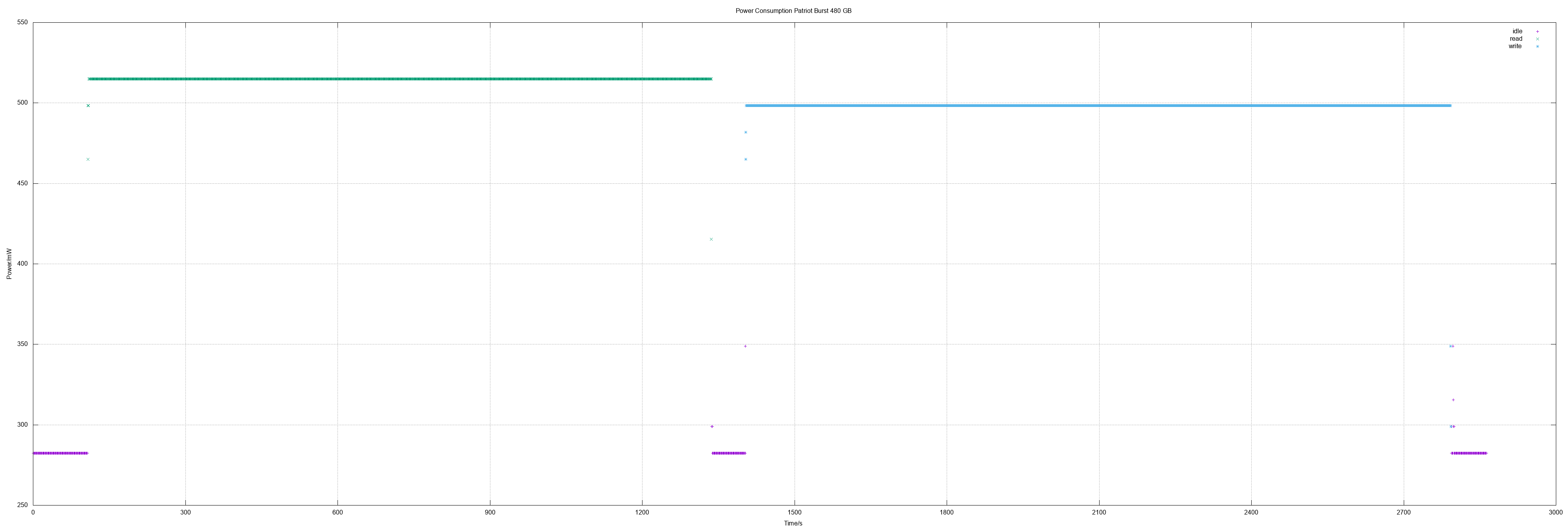
<p>
Finally the third Patriot Burst was tested. The results for the 480 are
the same like for the 240: Lowest power consumption and highest speed.
Additionally a 2.5 hard disk from WD was tested and two 3.5 disks to see
the difference between 2.5 and 3.5.
</p>

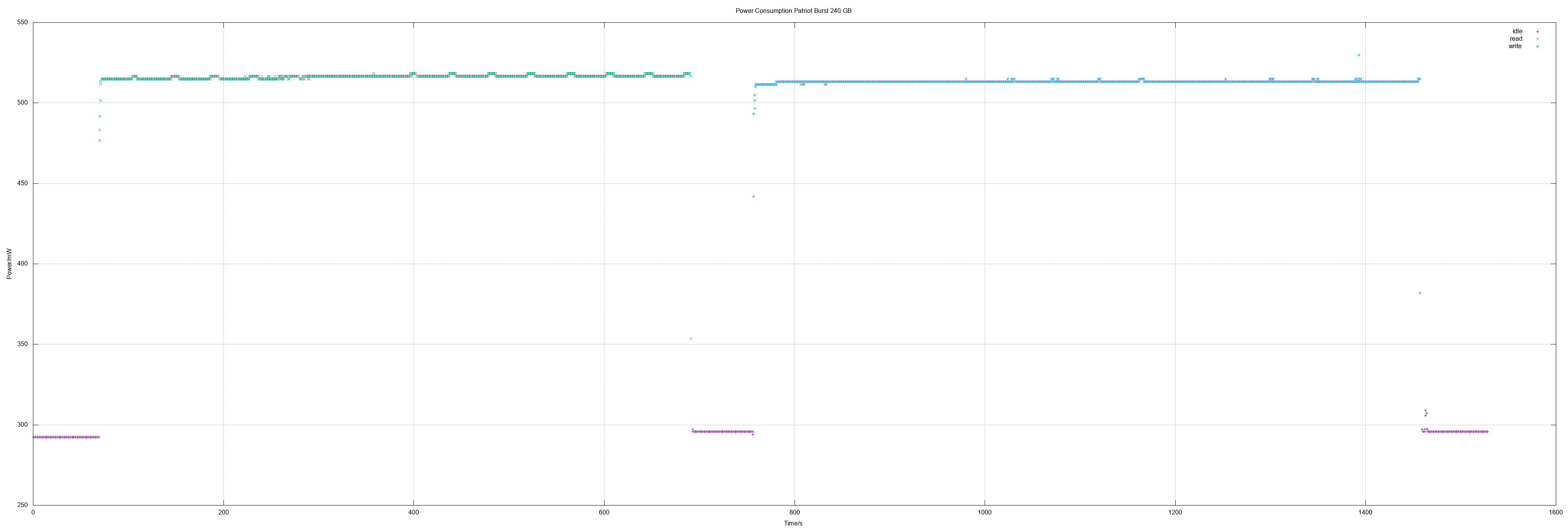
<h4>Patriot Burst 480</h4>
<p>
480 GB means actually 937703088 sectors.
</p>
<ul>
<li>Idle 0.28 W</li>
<li>Read 0.51 W</li>
<li>Write 0.5 W</li>
<li>Read all sectors: 20m32.578s (371 MiB/s)</li>
<li>Write all sectors: 23m15.145s (328 MiB/s)</li>
</ul>
<p style="text-align:center">
<a href="/blog/ssd-power-measuring-patriot-burst-480-gb/patriot-burst-480GB_big.png"><img src="/blog/ssd-power-measuring-patriot-burst-480-gb/patriot-burst-480GB_small.png" width="440" height="320" alt="x-y diagram of measurements" /></a>
</p>

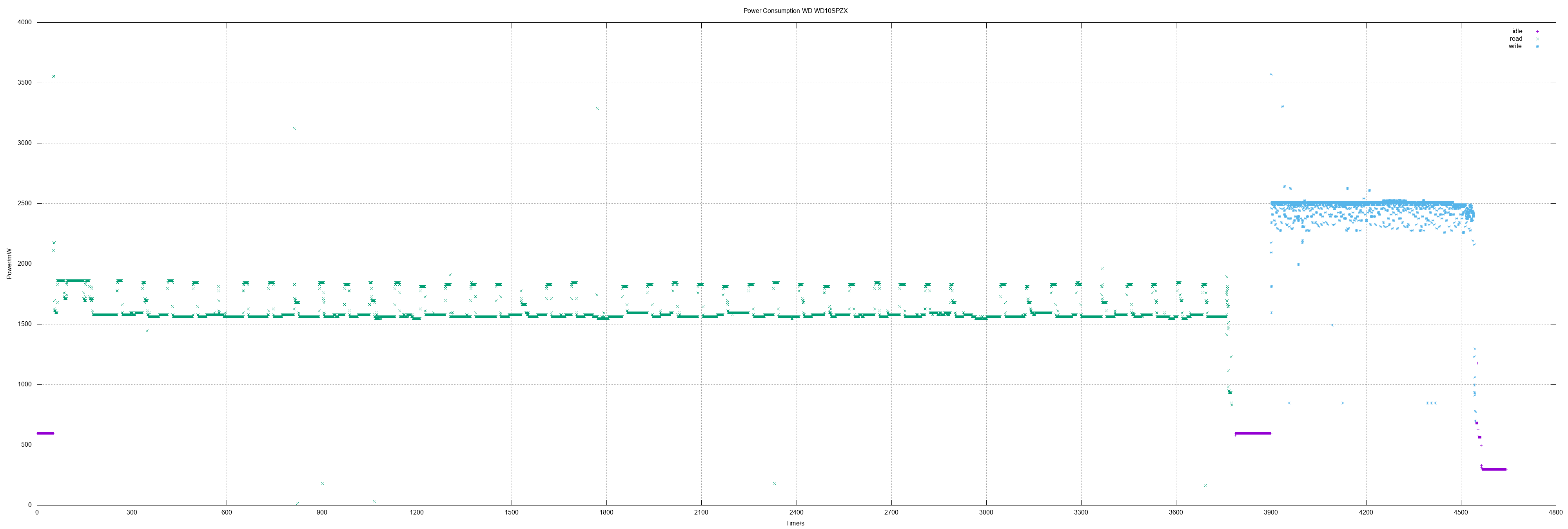
<h4>WD WD10SPZX</h4>
<p>
This is a 2.5 hard disk with 1953525168 sectors.
</p>
<ul>
<li>Idle 0.6 W</li>
<li>Read 1.62 W</li>
<li>Write 2.47 W</li>
<li>Read all sectors: 62m5.537s (256 MiB/s)</li>
</ul>
<p style="text-align:center">
<a href="/blog/hd-power-measuring-wd-blue-1-tb-wd10spzx/wd-wd10spzx_big.png"><img src="/blog/hd-power-measuring-wd-blue-1-tb-wd10spzx/wd-wd10spzx_small.png" width="440" height="320" alt="x-y diagram of measurements" /></a>
</p>

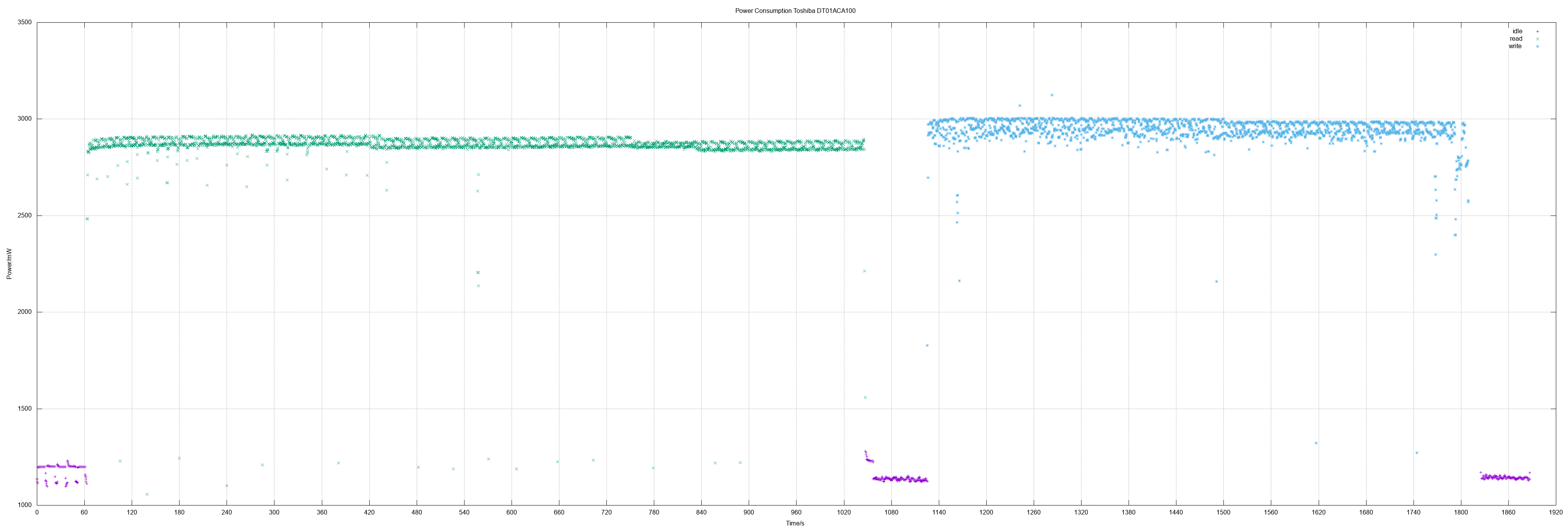
<h4>Toshiba DT01ACA100</h4>
<p>
This is a 3.5 hard disk with 1 TB.
</p>
<ul>
<li>Idle 1.15 W</li>
<li>Read 2.86 W</li>
<li>Write 2.94 W</li>
</ul>
<p style="text-align:center">
<a href="/blog/hd-power-measuring-toshiba-dt01aca100/toshiba-dt01aca100_big.png"><img src="/blog/hd-power-measuring-toshiba-dt01aca100/toshiba-dt01aca100_small.png" width="440" height="320" alt="x-y diagram of measurements" /></a>
</p>

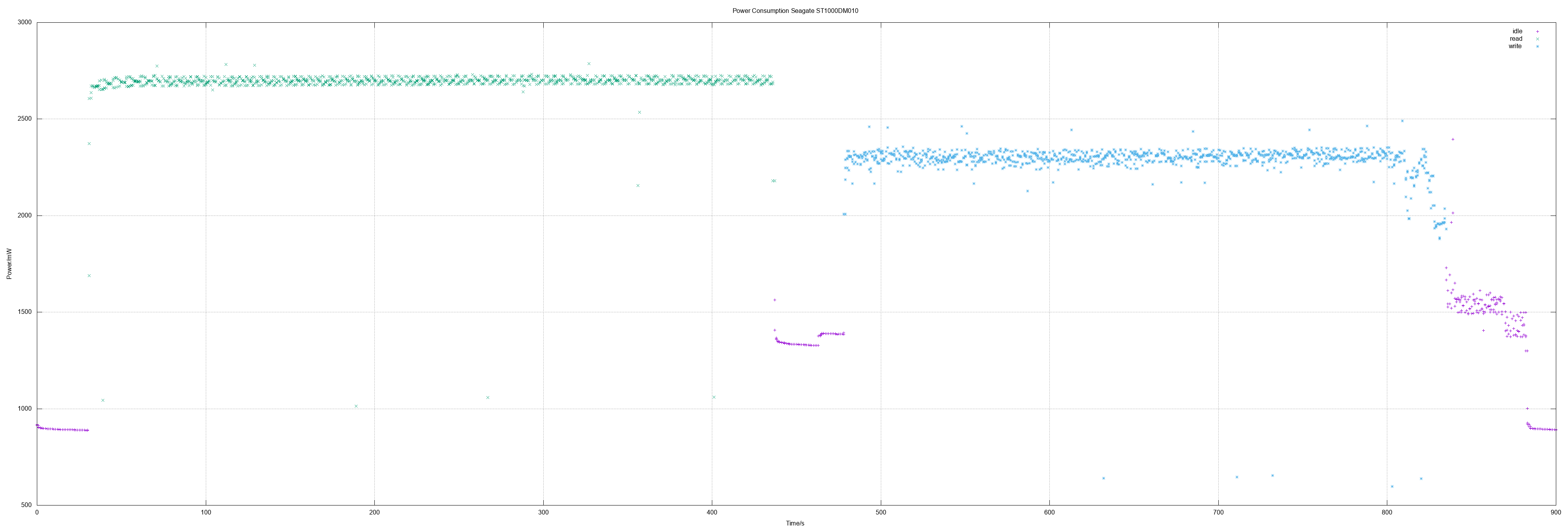
<h4>Seagate ST1000DM010</h4>
<p>
This is a 3.5 hard disk with 1 TB.
</p>
<ul>
<li>Idle 1.26 W</li>
<li>Read 2.69 W</li>
<li>Write 2.29 W</li>
</ul>
<p style="text-align:center">
<a href="/blog/hd-power-measuring-seagate-st1000dm010/seagate-st1000dm010_big.png"><img src="/blog/hd-power-measuring-seagate-st1000dm010/seagate-st1000dm010_small.png" width="440" height="320" alt="x-y diagram of measurements" /></a>
</p>

<h4>Values overview</h4>
<table cellpadding=4 border=0>
<tr>
<th>SATA SSD</th>
<th>r pow<br>(W)</th>
<th>w pow<br>(W)</th>
<th>r spd<br>(MB/s)</th>
<th>w spd<br>(MB/s)</th>
</tr>
<tr>
<th><a href="/blog/archives/2018/04/04/power_measuring_adata_su800/index.html">ADATA SU800 256</a></th>
<td>1.4</td>
<td>2.2</td>
<td></td>
<td></td>
</tr>
<tr>
<th><a href="/blog/archives/2018/10/03/power_measuring_corsair_force_le200b_120_gb_2/index.html">Corsair Force LE 120</a></th>
<td>0.58</td>
<td>0.58</td>
<td></td>
<td></td>
</tr>
<tr>
<th><a href="/blog/archives/2018/10/03/power_measuring_kingston_a400_120_gb/index.html">Kingston A400 120</a></th>
<td>0.51</td>
<td>1.03</td>
<td>371</td>
<td></td>
</tr>
<tr>
<th><a href="/blog/archives/2019/02/25/power_measuring_kingston_a400_240_gb/index.html">Kingston A400 240</a></th>
<td>0.52</td>
<td>1.08</td>
<td>371</td>
<td>290</td>
</tr>
<tr>
<th><a href="/blog/archives/2019/01/06/power_measuring_patriot_burst_120_gb/index.html">Patriot Burst 120</a></th>
<td>0.54</td>
<td>0.54</td>
<td>371</td>
<td>86</td>
</tr>
<tr>
<th><a href="/blog/archives/2019/12/16/power_measuring_patriot_burst_240_and_verbatim_vi500_s3_240480/index.html">Patriot Burst 240</a></th>
<td>0.52</td>
<td>0.52</td>
<td>369</td>
<td>327</td>
</tr>
<tr>
<th><a href="/blog/archives/2020/01/04/power_measuring_patriot_burst_480_and_wd_wd10spzx/index.html">Patriot Burst 480</a></th>
<td>0.51</td>
<td>0.5</td>
<td>371</td>
<td>328</td>
</tr>
<tr>
<th><a href="/blog/archives/2018/04/06/power_measuring_sandisk_z410/index.html">Sandisk Z410 120</a></th>
<td>0.7</td>
<td>1.5</td>
<td></td>
<td></td>
</tr>
<tr>
<th><a href="/blog/archives/2019/12/16/power_measuring_patriot_burst_240_and_verbatim_vi500_s3_240480/index.html">Verbatim Vi500 S3 240</a></th>
<td>0.59</td>
<td>0.98</td>
<td>211</td>
<td>117</td>
</tr>
<tr>
<th><a href="/blog/archives/2019/12/16/power_measuring_patriot_burst_240_and_verbatim_vi500_s3_240480/index.html">Verbatim Vi500 S3 480</a></th>
<td>0.84</td>
<td>1.13</td>
<td>359</td>
<td>129</td>
</tr>
<tr>
<th><a href="/blog/archives/2018/04/09/power_measuring_wd_green_pc_ssd_120_gb/index.html">WD Green 120</a></th>
<td>0.96</td>
<td>1.3</td>
<td></td>
<td></td>
</tr>
</table>
<table cellpadding=4 border=0>
<tr>
<th>2.5 HD</th>
<th>r pow<br>(W)</th>
<th>w pow<br>(W)</th>
<th>r spd<br>(MB/s)</th>
<th>w spd<br>(MB/s)</th>
</tr>
<tr>
<th><a href="/blog/archives/2019/01/06/power_measuring_seagate_st1000lm048/index.html">Seagate ST1000LM048</a></th>
<td>2.7</td>
<td>2.6</td>
<td></td>
<td></td>
</tr>
<tr>
<th><a href="/blog/archives/2019/01/06/power_measuring_toshiba_mq02abd100h/index.html">Toshiba MQ02ABD100H</a></th>
<td>2.6</td>
<td>3.0</td>
<td></td>
<td></td>
</tr>
<tr>
<th><a href="/blog/archives/2020/01/04/power_measuring_patriot_burst_480_and_wd_wd10spzx/index.html">WD WD10SPZX</a></th>
<td>1.62</td>
<td>2.47</td>
<td>256</td>
<td></td>
</tr>
</table>
<table cellpadding=4 border=0>
<tr>
<th>3.5 HD</th>
<th>r pow<br>(W)</th>
<th>w pow<br>(W)</th>
<th>r spd<br>(MB/s)</th>
<th>w spd<br>(MB/s)</th>
</tr>
<tr>
<th><a href="/blog/archives/2020/01/04/power_measuring_patriot_burst_480_and_wd_wd10spzx/index.html">Seagate ST1000DM010</a></th>
<td>2.69</td>
<td>2.29</td>
<td></td>
<td></td>
</tr>
<tr>
<th><a href="/blog/archives/2020/01/04/power_measuring_patriot_burst_480_and_wd_wd10spzx/index.html">Toshiba DT01ACA100</a></th>
<td>2.86</td>
<td>2.94</td>
<td></td>
<td></td>
</tr>
</table>

<h4>Method</h4>
<p>
Measuring environment is explained in
<a href="/blog/archives/2018/04/04/power_measuring_adata_su800/index.html">power measuring ADATA SU800</a>.
The speed as logged and calculated in latest measurements was simply done by
taking the time for reading and writing the whole SSD in relation to its size.
</p>

<h4>Other measurements</h4>
<ul>
<li><a
href="/blog/archives/2019/12/16/power_measuring_patriot_burst_240_and_verbatim_vi500_s3_240480/index.html">Patriot
Burst 240, Verbatim Vi500 S3 240/480</a></li>
<li><a href="/blog/archives/2019/02/25/power_measuring_kingston_a400_240_gb/index.html">Kingston A400 240 GB</a></li>
<li><a href="/blog/archives/2019/01/06/power_measuring_patriot_burst_120_gb/index.html">Patriot Burst 120 GB</a></li>
<li><a href="/blog/archives/2019/01/06/power_measuring_seagate_st1000lm048/index.html">Seagate ST1000LM048</a></li>
<li><a href="/blog/archives/2019/01/06/power_measuring_toshiba_mq02abd100h/index.html">Toshiba MQ02ABD100H</a></li>
<li><a href="/blog/archives/2018/10/03/power_measuring_corsair_force_le200b_120_gb_2/index.html">Corsair Force LE200B 120 GB (2nd disk measured)</a></li>
<li><a href="/blog/archives/2018/10/03/power_measuring_kingston_a400_120_gb/index.html">Kingston A400 120 GB</a></li>
<li><a href="/blog/archives/2018/05/11/power_measuring_corsair_force_le200b_120_gb/index.html">Corsair Force LE200B 120 GB</a></li>
<li><a href="/blog/archives/2018/04/09/power_measuring_wd_green_pc_ssd_120_gb/index.html">WD Green PC SSD</a></li>
<li><a href="/blog/archives/2018/04/04/power_measuring_adata_su800/index.html">ADATA SU800</a></li>
<li><a href="/blog/archives/2018/04/06/power_measuring_sandisk_z410/index.html">Sandisk Z410</a></li>
</ul>
</div>
</content>

</entry>
<entry>
<title type="html">Power Measuring Patriot Burst 240 and Verbatim Vi500 S3 240/480</title>
<author>
<name>Frank W. Bergmann</name>
</author>
<link rel="alternate" type="text/html" href="/blog/archives/2019/12/16/power_measuring_patriot_burst_240_and_verbatim_vi500_s3_240480/index.html"/>

<id>/blog/archives/2019/12/16/power_measuring_patriot_burst_240_and_verbatim_vi500_s3_240480/index.html</id>
<published>2019-12-16T22:10:19+02:00</published>
<updated>2019-12-16T22:10:19+02:00</updated>
<category term="ssd" />
<category term="power_measuring" />
<content type="xhtml">
<div xmlns="http://www.w3.org/1999/xhtml">

<p>
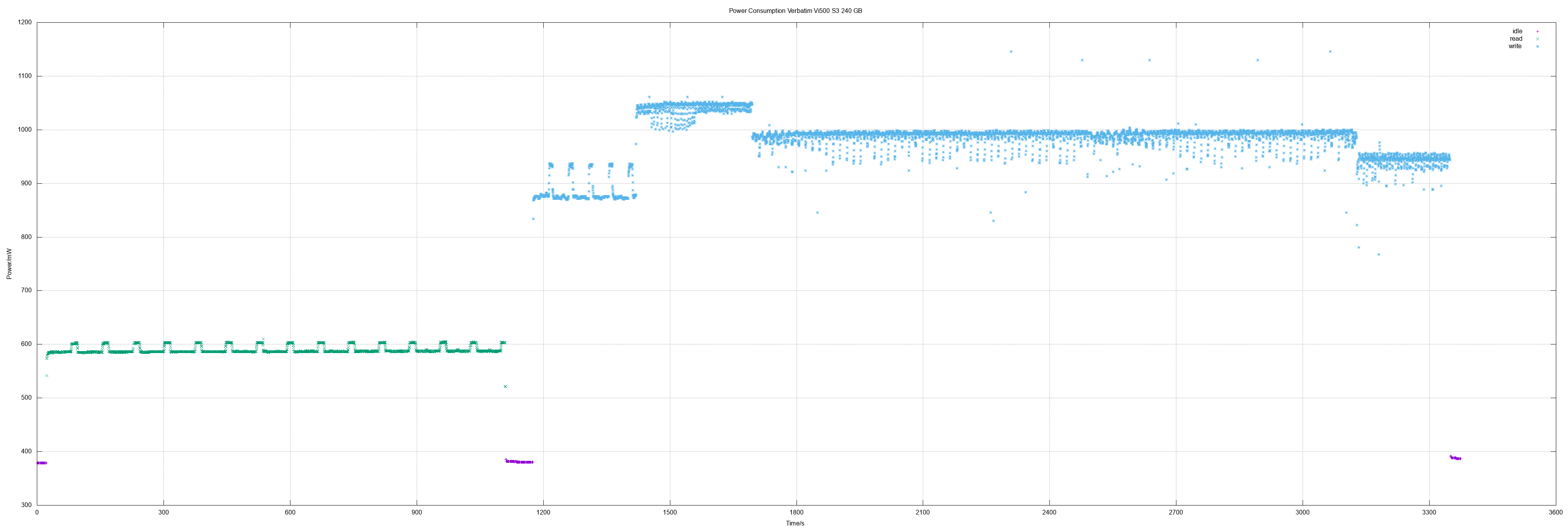
This time three SSDs were measured. The Patriot Burst 240 is an exceptional
SSD of all measured ones so far: It has the lowest power consumption combined
with the highest speed - and it was also the cheapest one.
</p>

<h4>Patriot Burst 240</h4>
<p>
240 GB means actually 468862128 sectors.
</p>
<ul>
<li>Idle 0.3 W</li>
<li>Read 0.52 W</li>
<li>Write 0.5 - 0.53 W, avg. 0.52 W</li>
<li>Read all sectors: 10m19.060s (369 MB/s)</li>
<li>Write all sectors: 11m39.184s (327 MB/s)</li>
</ul>
<p style="text-align:center">
<a href="/blog/ssd-power-measuring-patriot-burst-240-gb/patriot-burst-240GB_big.png"><img src="/blog/ssd-power-measuring-patriot-burst-240-gb/patriot-burst-240GB_small.png" width="440" height="320" alt="x-y diagram of measurements" /></a>
</p>

<h4>Verbatim Vi500 S3 240 GB</h4>
<ul>
<li>Idle 0.38 W</li>
<li>Read 0.59 W</li>
<li>Write 0.77 - 1.15 W, avg. 0.98 W</li>
<li>Read all sectors: 17m59.678s (211 MB/s)</li>
<li>Write all sectors: 32m23.151s (117 MB/s)</li>
</ul>
<p style="text-align:center">
<a href="/blog/ssd-power-measuring-verbatim-vi500-s3-240-gb/verbatim-Vi500-S3-240GB_big.png"><img src="/blog/ssd-power-measuring-verbatim-vi500-s3-240-gb/verbatim-Vi500-S3-240GB_small.png" width="440" height="320" alt="x-y diagram of measurements" /></a>
</p>

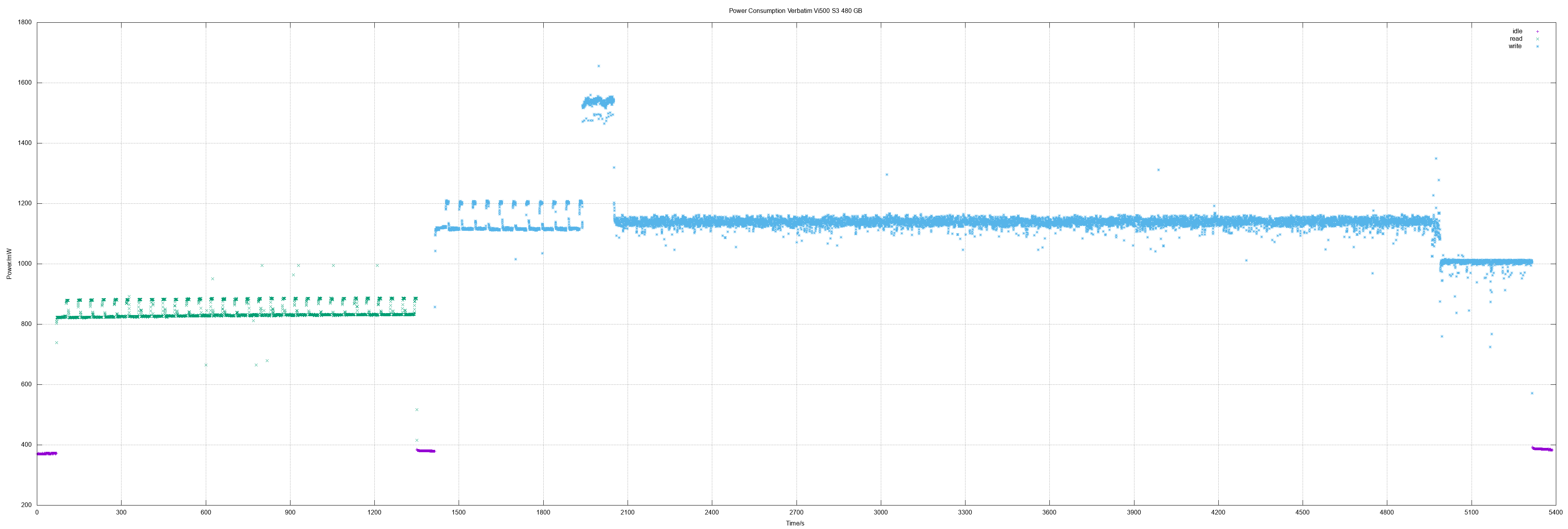
<h4>Verbatim Vi500 S3 480 GB</h4>
<p>
480 GB means actually 937703088 sectors.
</p>
<ul>
<li>Idle 0.38 W</li>
<li>Read 0.84 W</li>
<li>Write 0.72 - 1.65 W, avg. 1.13 W</li>
<li>Read all sectors: 21m14.385s (359 MB/s)</li>
<li>Write all sectors: 59m9.244s (129 MB/s)</li>
</ul>
<p style="text-align:center">
<a href="/blog/ssd-power-measuring-verbatim-vi500-s3-480-gb/verbatim-Vi500-S3-480GB_big.png"><img src="/blog/ssd-power-measuring-verbatim-vi500-s3-480-gb/verbatim-Vi500-S3-480GB_small.png" width="440" height="320" alt="x-y diagram of measurements" /></a>
</p>

<h4>Values overview</h4>
<table cellpadding=4 border=0>
<tr>
<td></td>
<th>read</th>
<th>write</th>
<th>r speed</th>
<th>w speed</th>
</tr>
<tr>
<th>Sandisk Z410 120</th>
<td>0.7 W</td>
<td>1.5 W</td>
<td></td>
<td></td>
</tr>
<tr>
<th>ADATA SU800 256</th>
<td>1.4 W</td>
<td>2.2 W</td>
<td></td>
<td></td>
</tr>
<tr>
<th>WD Green 120</th>
<td>0.96 W</td>
<td>1.3 W</td>
<td></td>
<td></td>
</tr>
<tr>
<th>Kingston A400 120</th>
<td>0.51 W</td>
<td>1.03 W</td>
<td>371 MB/s</td>
<td></td>
</tr>
<tr>
<th>Corsair Force LE 120</th>
<td>0.58 W</td>
<td>0.58 W</td>
<td></td>
<td></td>
</tr>
<tr>
<th>Patriot Burst 120</th>
<td>0.54 W</td>
<td>0.54 W</td>
<td>371 MB/s</td>
<td>86 MB/s</td>
</tr>
<tr>
<th>Kingston A400 240</th>
<td>0.52 W</td>
<td>1.08 W</td>
<td>371 MB/s</td>
<td>290 MB/s</td>
</tr>
<tr>
<th>Patriot Burst 240</th>
<td>0.52 W</td>
<td>0.52 W</td>
<td>369 MB/s</td>
<td>327 MB/s</td>
</tr>
<tr>
<th>Verbatim Vi500 S3 240</th>
<td>0.59 W</td>
<td>0.98 W</td>
<td>211 MB/s</td>
<td>117 MB/s</td>
</tr>
<tr>
<th>Verbatim Vi500 S3 480</th>
<td>0.84 W</td>
<td>1.13 W</td>
<td>359 MB/s</td>
<td>129 MB/s</td>
</tr>
</table>

<h4>Method</h4>
<p>
Measuring environment is explained in
<a href="/blog/archives/2018/04/04/power_measuring_adata_su800/index.html">power measuring ADATA SU800</a>.
The speed as logged and calculated in latest measurements was simply done by
taking the time for reading and writing the whole SSD in relation to its size.
</p>

<h4>Other measurements</h4>
<ul>
<li><a href="/blog/archives/2019/02/25/power_measuring_kingston_a400_240_gb/index.html">Kingston A400 240 GB</a></li>
<li><a href="/blog/archives/2019/01/06/power_measuring_patriot_burst_120_gb/index.html">Patriot Burst 120 GB</a></li>
<li><a href="/blog/archives/2019/01/06/power_measuring_seagate_st1000lm048/index.html">Seagate ST1000LM048</a></li>
<li><a href="/blog/archives/2019/01/06/power_measuring_toshiba_mq02abd100h/index.html">Toshiba MQ02ABD100H</a></li>
<li><a href="/blog/archives/2018/10/03/power_measuring_corsair_force_le200b_120_gb_2/index.html">Corsair Force LE200B 120 GB (2nd disk measured)</a></li>
<li><a href="/blog/archives/2018/10/03/power_measuring_kingston_a400_120_gb/index.html">Kingston A400 120 GB</a></li>
<li><a href="/blog/archives/2018/05/11/power_measuring_corsair_force_le200b_120_gb/index.html">Corsair Force LE200B 120 GB</a></li>
<li><a href="/blog/archives/2018/04/09/power_measuring_wd_green_pc_ssd_120_gb/index.html">WD Green PC SSD</a></li>
<li><a href="/blog/archives/2018/04/04/power_measuring_adata_su800/index.html">ADATA SU800</a></li>
<li><a href="/blog/archives/2018/04/06/power_measuring_sandisk_z410/index.html">Sandisk Z410</a></li>
</ul>
</div>
</content>

</entry>
<entry>
<title type="html">ODROID GO as network tool</title>
<author>
<name>Frank W. Bergmann</name>
</author>
<link rel="alternate" type="text/html" href="/blog/archives/2019/09/22/odroid_go_as_network_tool/index.html"/>

<id>/blog/archives/2019/09/22/odroid_go_as_network_tool/index.html</id>
<published>2019-09-22T22:47:24+02:00</published>
<updated>2019-09-22T22:47:24+02:00</updated>
<category term="c" />
<category term="embedded" />
<category term="networking" />
<content type="xhtml">
<div xmlns="http://www.w3.org/1999/xhtml">

<p>
<a href="https://www.hardkernel.com/shop/odroid-go/">Hardkernel</a>'s
<a href="https://wiki.odroid.com/odroid_go/odroid_go">ODROID GO</a>
handheld game kit is well known for his ability to emulate Gameboy and many
more game consoles as also for ports of games like 3D Wolfenstein or Doom.
</p>
<p>
But with his versatile peripheral hardware like e.g. WiFi, Bluetooth and
his expansion port with GPIO pins it allows a wide range of applications.
Example applications with external hardware are a Weather Station and an
Ultrasonic Distance Meter.
</p>
<p>
Programming is easy with the Arduino IDE even for novices. A lot of
libraries are already available because ORDROID GO is based on the widely
used ESP32 platform.
</p>
<p>
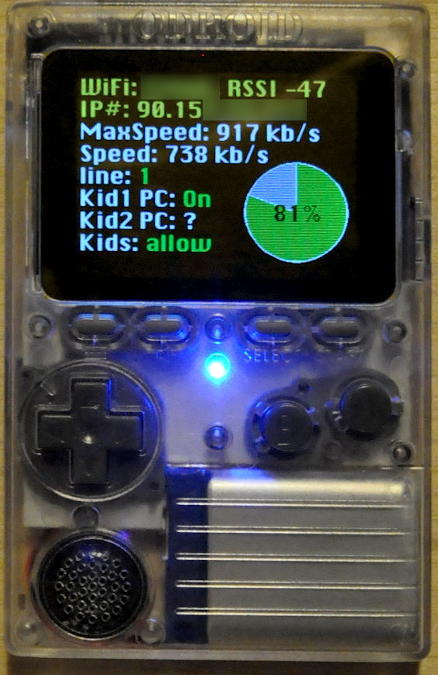
As first application I started developing of a "WiFi/network tool".
Currently it can do some network tests and light configuration changes in
our network. This is an example screenshot:
</p>
<p>
<img src="https://www.tuxad.com/blog/files/odroid-go-wific.jpg" alt="screenshot wific application" />
</p>
<p>
The Wifi connection works very well even through some walls. This Proof Of
Concept is already very useful and I will continue to enhance it.
</p>
</div>
</content>

</entry>
<entry>
<title type="html">Workaround for Unity installation issue &quot;not enough space&quot;</title>
<author>
<name>Frank W. Bergmann</name>
</author>
<link rel="alternate" type="text/html" href="/blog/archives/2019/09/20/workaround_for_unity_installation_issue_not_enough_space/index.html"/>

<id>/blog/archives/2019/09/20/workaround_for_unity_installation_issue_not_enough_space/index.html</id>
<published>2019-09-20T23:22:47+02:00</published>
<updated>2019-09-20T23:22:47+02:00</updated>
<category term="c" />
<category term="shell" />
<content type="xhtml">
<div xmlns="http://www.w3.org/1999/xhtml">

<p>
Some days ago my son told me that he had an issue on installing Unity via
UnityHubSetup on Linux: Even with specifying TMPDIR and selecting home
partition as installation target the installer did still show the (low) free
disk space of the root partition.
</p>

<p>
There are several pages about this topic but apparently there's no easy
solution for this issue. I told him that (assuming that you actually have
enough free disk space) the disk space can be "faked" by pre-loading a
shared library where the statfs() calls are wrapping the system calls and
are "faking" the results.
</p>

<p>
As Proof-of-Concept and for educational purposes I wrote this fake library
and a small shell script to control the Unity installer and the lib. A small
issue is that the executable UnityHubSetup.AppImage is actually unpacking
some kind of image and then starting the actual installer from this image.
As a solution my script will launch UnityHubSetup.AppImage to get the image
unpacked, then terminate UnityHubSetup.AppImage and finally start the real
installer with the fake library preloaded. That causes the installer window
flashing one time and then opening up finally.
</p>

<p>
Script and fake lib as archive:
<a href="https://www.tuxad.com/blog/files/unityhubsetup-fake-diskspace.tar.gz">unityhubsetup-fake-diskspace.tar.gz</a>
</p>

<p>
Content of the archive:
</p>

<pre>
$ ls -1 unityhubsetup-fake-diskspace
README
launch-uhs-with-faked-increased-diskspace.sh
wrap_statfs.c
wrap_statfs.so
</pre>

<p>
Some technical details:
The actual free space is multiplied with a constant factor...
</p>

<pre>
$ grep -B3 'resize_factor =' wrap_statfs.c 
/**
 * multiply free space with resize_factor
 */
static const int resize_factor = 16;
</pre>

<p>
... and this is an implementation of a faked call:
</p>

<pre>
$ fgrep -A9 'int statfs(' wrap_statfs.c 
int statfs(const char *path, struct statfs *buf) {
  int result;
  write(2, MESSAGE_STATFS, (sizeof MESSAGE_STATFS) - 1);
  actual_statfs = dlsym(RTLD_NEXT, "statfs");
  result = actual_statfs(path, buf);
  if (result == 0) {
    SET(buf->f_blocks, buf->f_bfree, buf->f_bavail);
  }
  return result;
}
</pre>
</div>
</content>

</entry>
<entry>
<title type="html">RHEL 5 dovecot fix for CVE-2019-11500</title>
<author>
<name>Frank W. Bergmann</name>
</author>
<link rel="alternate" type="text/html" href="/blog/archives/2019/08/31/rhel_5_dovecot_fix_for_cve-2019-11500/index.html"/>

<id>/blog/archives/2019/08/31/rhel_5_dovecot_fix_for_cve-2019-11500/index.html</id>
<published>2019-08-31T16:34:26+02:00</published>
<updated>2019-08-31T16:34:26+02:00</updated>
<category term="rpm" />
<category term="repository" />
<category term="redhat" />
<content type="xhtml">
<div xmlns="http://www.w3.org/1999/xhtml">
<p>
Updated dovecot RPM package for RHEL / CentOS 5 is available in
<a href="/blog/archives/2015/04/26/tuxad_yum_package_repository_for_rhel__centos_5_x86_64/index.html">tuxad repository</a>:
</p>
<ul>
<li><a href="https://www.tuxad.com/repo/5/i386/tuxad/dovecot-1.0.7-9.el5_11.5.i386.rpm">dovecot-1.0.7-9.el5_11.5.i386.rpm</a></li>
<li><a href="https://www.tuxad.com/repo/5/x86_64/tuxad/dovecot-1.0.7-9.el5_11.5.x86_64.rpm">dovecot-1.0.7-9.el5_11.5.x86_64.rpm</a></li>
</ul>
<p>
Please use <kbd>yum update</kbd> to update.
</p>

<p>
For RHEL 6 there's at least an SRPM package available:
<a href="https://www.tuxad.com/repo/6/SRPMS/dovecot-2.0.9-22.el6.1.src.rpm">repo/6/SRPMS/dovecot-2.0.9-22.el6.1.src.rpm</a>.
</p>

<p>
News history tuxad repository:
</p>
<ul>
<li>2018/08 <a href="/blog/archives/2018/10/15/sni_in_rhel_5_apache/index.html">SNI in RHEL 5 Apache</a></li>
<li>2018/07 <a href="/blog/archives/2018/07/21/tuxad_rh5_repo_now_with_phpopenssl1/index.html">tuxad RH5 repo now with PHP/openssl1</a></li>
<li>2016/10 <a href="/blog/archives/2016/10/17/more_packages_recompiled_against_openssl_1/index.html">More packages recompiled against OpenSSL 1</a></li>
<li>2016/05 <a href="/blog/archives/2016/05/28/rhel_5_rpm_packages_with_ssl_enhancements/index.html">RHEL 5 RPM packages with SSL enhancements</a></li>
<li>2016/03 <a href="/blog/archives/2016/03/06/enhanced_encryption_for_dovecot_on_rhelcentos_5/index.html">Enhanced encryption for dovecot on RHEL/CentOS 5</a></li>
<li>2015/04 <a href="/blog/archives/2015/04/26/tuxad_yum_package_repository_for_rhel__centos_5_x86_64/index.html">tuxad yum package repository for RHEL / CentOS 5 x86_64</a></li>
<li>2014/12 <a href="/blog/archives/2014/12/07/yum_repository_for_rhel__centos_5/index.html">YUM repository for RHEL / CentOS 5</a></li>
<li>2014/11 <a href="/blog/archives/2014/11/19/openssl_updatesenhancements_for_rhel__centos_5/index.html">OpenSSL updates/enhancements for RHEL / Centos 5</a></li>
</ul>
</div>
</content>

</entry>

</feed>